With over 100 million monthly active users (MAU), you shouldn’t be overlooking Microsoft Copilot Search in your answer engine optimization (AEO) efforts. But what really makes your AI visibility efforts for Copilot worth it is the fact that it’s in second place behind ChatGPT in terms of referral share. This means that out of 2.8 million web sessions initiated from clicking an LLM citation between May and September, 3.2% of them came from Copilot, more than any other LLM besides ChatGPT.
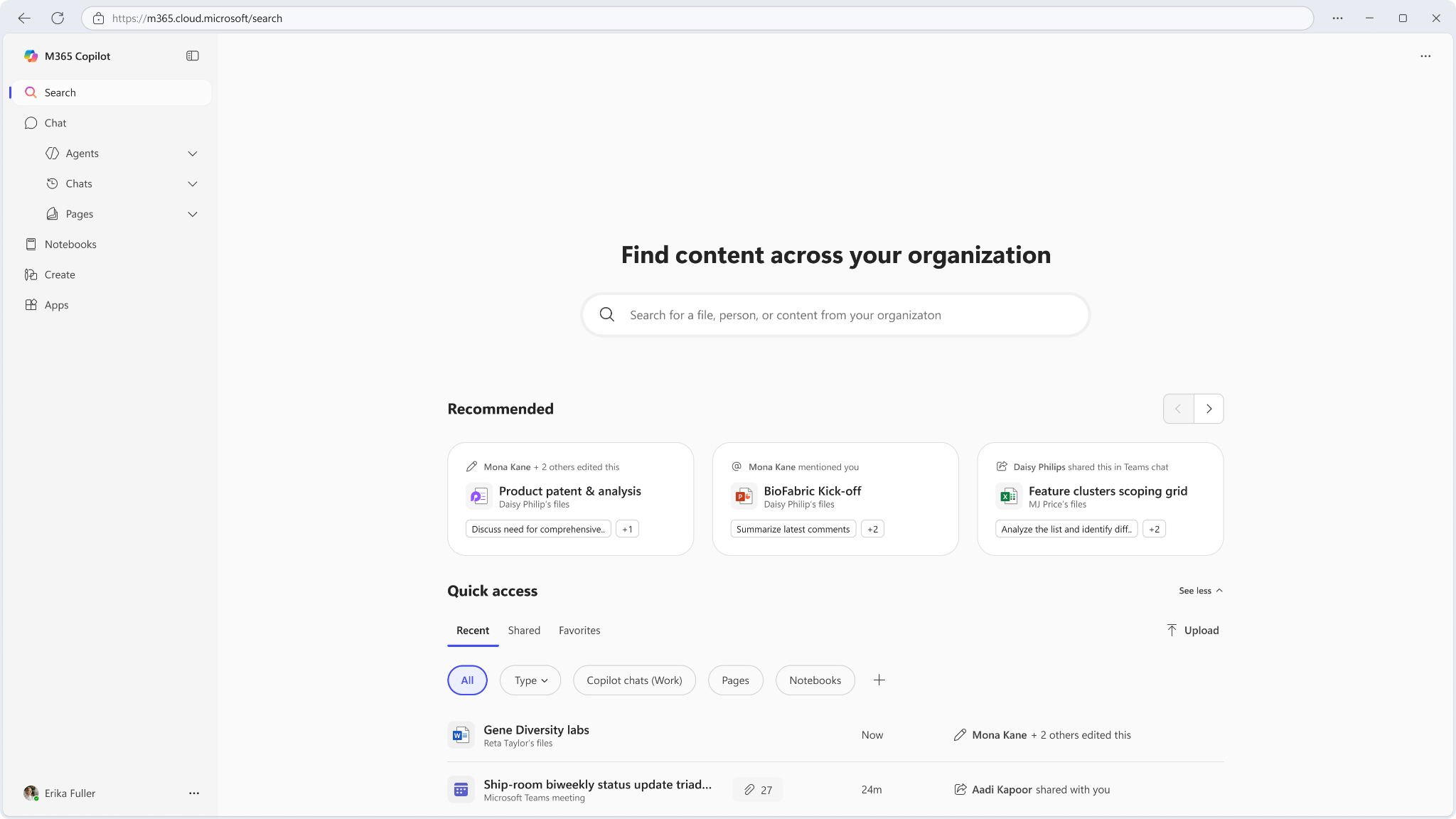
You’re probably wondering: Why is that? The thing is, Copilot isn’t just an answer engine like ChatGPT, Gemini, and other LLMs. It’s integrated within the Microsoft 365 Suite, similar to how Gemini is integrated into the Google Suite. The mere fact that it’s integrated into the apps that people use daily means that there are likely more eyes on it than marketers might anticipate, which is something you can use to your advantage if you know how. If you don’t, stick around, because we’re going to be giving you strategies to make sure you’re visible in Copilot.
How Does Microsoft Copilot Search Work?
Microsoft Copilot operates with the Microsoft Prometheus model, which was built with a combination of LLM frameworks, most notably GPT-4 and GPT-5. This means that if you’re already optimizing for ChatGPT, you’re also optimizing for Microsoft Copilot.
Copilot in Microsoft 365 Suite
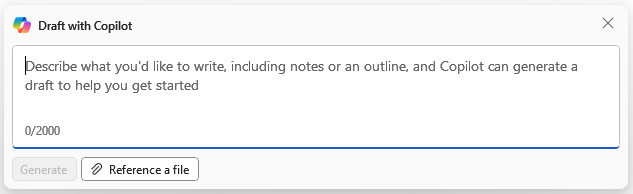
Obviously, ChatGPT and Microsoft Copilot aren’t exactly the same. Copilot was fine-tuned with reinforcement learning (RL) to be able to smoothly integrate into the entire Microsoft ecosystem, making it a more specialized solution compared to ChatGPT. For example, if you’re in Microsoft Word, you can access Copilot for a variety of special-use cases (like creating a draft), or you can access the chatbot.
So, when you’re writing and optimizing content for Copilot, keep in mind that the people using it are likely to be using it within an app; if they’re writing a blog post in Word or PowerPoint, for example, they may ask Copilot for some data or information that your brand published, by chance. Because of that, informational intent should be a priority when you’re creating content to be visible in Copilot.
Copilot on Edge Browser
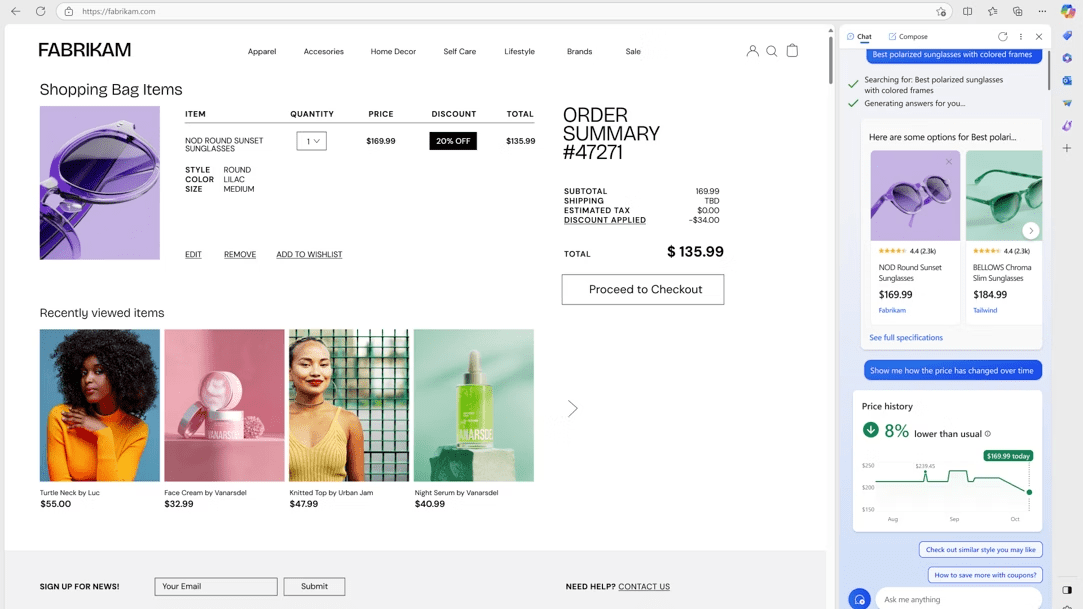
In addition to being accessible in Microsoft apps, Copilot is also accessible on Microsoft’s browser, Edge. Edge, despite not being as popular a solution as Chrome or Safari, still captures around 4.6% of the Global Browser Market Share, as reported in October 2025. So don’t discount the fact that you have an opportunity to reach a sizable portion of the population, one that you probably haven’t reached before.
Some of the most popular use cases for Copilot in Edge are shopping, email management, on-page assistance, streamlined new tabs, and more. Additionally, Copilot on Edge can see all of your open tabs, giving it context into users’ entire profiles—not just a singular page. Of all these use cases, optimizing so that your solution populates when a user is seeking shopping advice is going to be important. With this in mind, you’re going to need perfect metadata, such as schema markup and plain text product attributes, so that your brand gets recommended. On top of that, make sure you’re showing up in earned sources (and making your own), particularly “best of” listicles that include your product.
Optimizing Content for Microsoft Copilot Search
As mentioned, Microsoft Copilot functions on GPT models, so the strategies that you use to gain visibility in ChatGPT and other LLMs can also be applied here. We’re about to give you a refresher, though, if you need one.
Core Components
Optimizing for every AI solution requires a strategy rooted in creating chunkable, Q&A-formatted content that’s authoritative. Let’s dive into these core components of optimizing for Copilot.
Content as Modular Blocks
Copilot parses your pages into reusable chunks. If one chunk contains two unrelated ideas, the AI might skip the block entirely. To maximize your chances of being cited, ensure every paragraph or list item focuses on a single concept, making your page a cohesive database of answers. This also goes for sentences; make sure they’re self-contained, so that if you pulled one out of context, it would still make sense.
The Q&A Format
Since LLMs are trained to answer questions and operate in a conversational format, you should be structuring your content to follow this format.
- Use H2 or H3 headings to pose the specific question your user (or AI) is asking.
- Immediately follow that heading with a 1-2 sentence direct answer that accurately addresses the query.
- Structure pages around high-intent questions, like those found in the “People Also Ask” box. You should also check what topics competitors are ranking for with Ahrefs and answer those questions even better by addressing specific things that they haven’t.
Build Authority with H-E-E-A-T & PR
While structuring your content as we described makes your content eligible for citation, your authority is the “tie-breaker” that makes it preferable to other sources. Here are two ways to build it.
- H-E-E-A-T (Helpfulness, Expertise, Experience, Authoritativeness, and Trustworthiness) Framework: Following this framework means that you’re creating content that’s not only helpful for your audience but rooted in expertise and experience. This means that the people writing your content should be experts in the field, with the credentials to back it up. H-E-E-A-T content shows AI that you’re creating high-quality content that’s worthy of a citation.
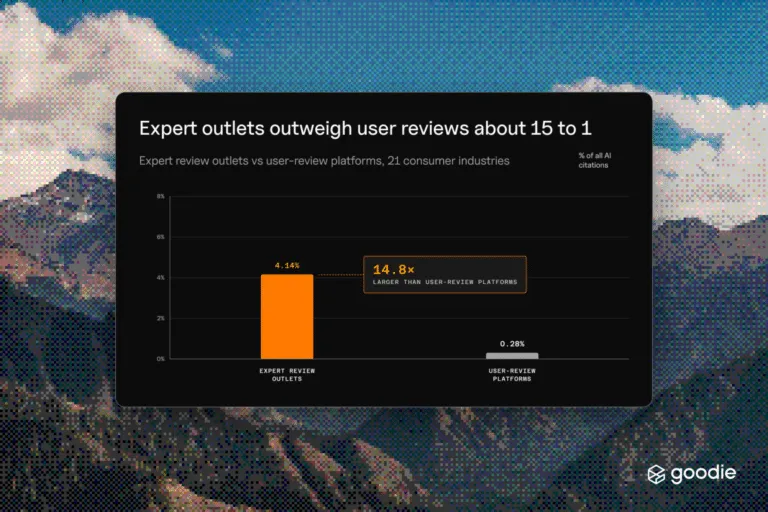
- Calculated PR Strategy: Our research shows that citations in LLMs are skewed toward high-authority third-party sources (earned media/PR). Your PR strategy should be aligned with your AEO/SEO goals to generate mentions, press releases, and backlinks from trusted industry publishers, which validates your authority for AI.
Technical AEO
It doesn’t matter how good your content is if your website isn’t technically sound. Crawlers will punish a site by reducing crawl budget, ignoring otherwise authoritative content, and causing user frustration that leads to lower engaged sessions. The good thing is that if you’ve been doing technical SEO, you’re already halfway there.
Schema Markup
While Q&A formatting sets up the text for readers and crawlers, schema is the code that makes that text readable for both search engines and AI crawlers. Beyond the basic FAQPage and HowTo Schema, marketers should use other types to reinforce entity and commercial intent:
- Product & Review Schema: If your content is commercial (SaaS platform, tool, or physical product), use Product and Review Schema. This explicitly labels your features, pricing, and star ratings, allowing Copilot to easily pull data.
- Organization Schema: This schema identifies your company as an official entity. It’s essential for linking your business name and establishing H-E-E-A-T signals.
- Article/NewsArticle Schema: Use this for all blog and article content to clearly define the headline, author, and publication date. Since LLMs prioritize freshness, this schema tells AI your information is current.
Crawl & Index Management
While Copilots crawlers are pretty smart, they still need some direction. Just like schema, the following implementations can help guide bots through your site.
- XML Sitemaps: Your sitemap signals to crawlers which pages are the most important and should be indexed. Ensure your best content is prioritized and linked within your sitemap.
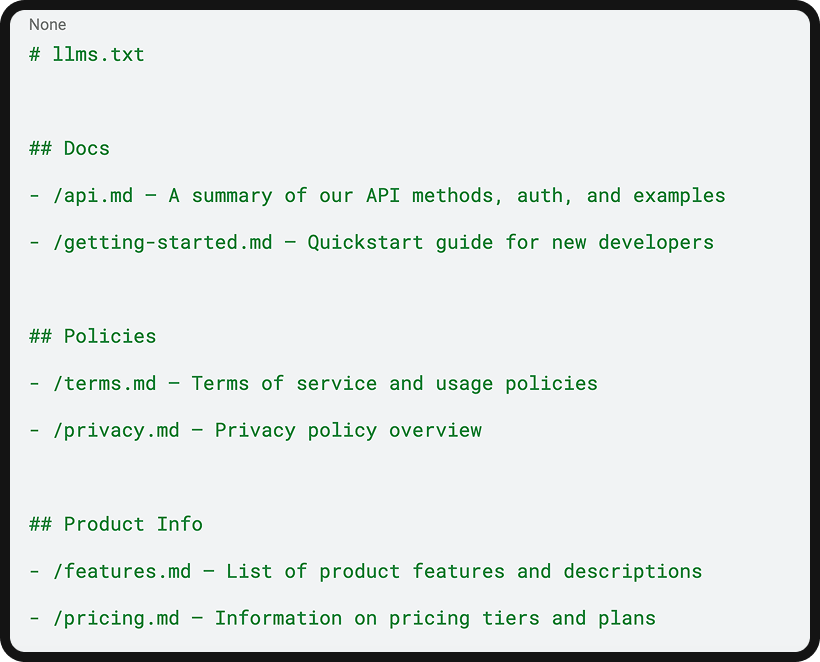
- LLMS.txt: Create a strategic LLMs.txt file that doesn’t just act as a blocker. Disallow indexing of low-quality or duplicate content (like filter pages, old staging URLs, or thank-you pages). This conserves your crawl budget and ensures Copilot only sees the most important content on your site.
- Canonical Tags: Use canonical tags to resolve duplicate content issues, ensuring Copilot focuses its citation weight on the correct page.
Tracking Visibility in Microsoft Copilot Search
Once you’ve optimized your website, you need to be monitoring its results; otherwise, you’re not going to be able to measure the true impact that your efforts had.
The Pivot from SEO to AEO Metrics
Visibility in Copilot is not determined by ranking position—it’s measured by Citation Frequency, Mentions, and Sentiment. You can use Goodie to easily track these metrics from Copilot and take the guesswork out of what you’re doing.
- Citation Frequency: How often a specific URL your brand created is referenced as a source in an AI-generated answer.
- Mentions: Instances where your brand is mentioned in the AI answer.
- Sentiment: Whether your brand is discussed positively, negatively, or neutrally within an AI answer.
Tracking Tactics & Metrics
If you want to do it on your own, though, there are a few strategies you can employ, alongside the metrics you should be tracking.
- Manual Query Audits: Systematically run your most important question-based keywords in Copilot, and manually log which sites are cited, which competitors are mentioned, and the exact content snippet used. Since AI responses shift constantly, you should run these audits weekly.
- GA4 Referral Segmentation: The traffic coming from Copilot often registers as a Referral in GA4, specifically from domains like copilot.microsoft.com. You can create a custom channel group in GA4 to isolate and track all traffic coming from known AI referral sources, effectively giving you an “AI Traffic” channel to analyze.
- Branded Queries in GSC: Monitor the volume of searches that include your brand name alongside generic product or problem-solving terms (e.g., “Brand X waterproof running shoe,” or “Brand Y pricing guide”). A successful AI citation in Copilot often leads a user to search for your brand directly to confirm the source.
Securing Brand Visibility on Microsoft Copilot
With Microsoft Copilot woven into one of the most popular enterprise productivity suites, you have an opportunity to capture a professional audience seeking solutions, as well as casual Copilot users who utilize it through Edge. And given the amount of referrals coming (and MAU) from Copilot, you’re missing out if you’re not optimizing for it.
The great thing about Copilot is the fact that it’s built on GPT models means that if you’ve been optimizing for ChatGPT (which you should be), you’re already optimizing for Copilot. So, don’t look at optimizing for Copilot as this huge extra pull, but instead as a way to refine your existing optimization strategies for ChatGPT. That way, you can kill two birds with one stone by capturing two high-intent audiences, making your AEO efforts more comprehensive.
AEO for Microsoft Copilot: FAQs
Microsoft Copilot Search is the AI-powered search layer built into Copilot, Microsoft’s assistant across Microsoft 365, Windows, and Edge. Rather than returning a list of links, it generates a direct answer pulled from Bing’s index, the open web, and (inside Microsoft 365 apps) a user’s own files and organizational data. Because it’s embedded in the tools people already use for work, brands get a shot at visibility outside the traditional browser-based search moment entirely.
Not exactly, but they’re close enough that your optimization work overlaps. Copilot runs on Microsoft’s Prometheus model, which combines GPT-4 and GPT-5 with Microsoft’s own reinforcement learning layer, tuned specifically to integrate with Microsoft 365 apps and Edge. If you’re already building H-E-E-A-T signals and structuring content for ChatGPT, you’re doing most of the work Copilot needs too. The difference is context: Copilot users are often mid-task inside Word, PowerPoint, or Edge, so informational, task-relevant content tends to outperform pure brand marketing copy.
Inside Microsoft 365 apps, Copilot is fine-tuned for task completion (drafting, summarizing, analyzing) which means informational and how-to content is more likely to surface. In Edge, Copilot behaves more like a shopping and browsing assistant; it can see all open tabs for context and is commonly used for product research and comparisons. That means schema markup and clean product attribute data matter more for Edge visibility, while structured, chunkable explainer content matters more for Microsoft 365 visibility.
Schema markup is the fastest way to make your content machine-readable for Copilot’s crawlers, but it only works if your content is already structured for chunking and Q&A extraction. Fixing schema on a page full of unstructured, multi-topic paragraphs won’t move the needle. Structure first, schema second.
Ranking position doesn’t apply here. Instead, track citation frequency (how often your URLs get referenced), brand mentions, and sentiment across Copilot answers, which is what Goodie’s AI visibility monitoring is built to surface automatically. If you’re tracking manually, run weekly query audits against your priority questions, segment GA4 referral traffic from copilot.microsoft.com, and watch branded search volume in Search Console for spikes that follow a citation.
No. Copilot’s shared foundation with GPT models means the content and authority signals that earn citations in ChatGPT largely transfer. Treat Copilot optimization as an extension of your existing AEO work, not a parallel project, and prioritize the platform-specific pieces (Edge shopping signals, Microsoft 365 task context) on top of that foundation.